


AI is now woven into nearly every stage of event planning and marketing. With so many tools out there, it can feel overwhelming to know where to start.
This guide cuts through that noise. Inside, you'll find AI-powered tools that support every stage of event marketing and planning. They cover everything from sourcing venues to turning one session into weeks of content. Some live inside CventIQ™, which brings AI-powered capabilities to every stage of the event lifecycle. Others are tools that can fit naturally into the marketing and event workflows you already run.
💡 Learn how Cvent approaches responsible AI in the Cvent Trust Center.
1. Session Snapshots and Takeaways
Taking notes during a live session often means missing the next big idea. Session Snapshots and Takeaways uses AI to help your attendees stay focused while capturing the moments that matter.
What it does
Available in the Cvent Attendee Hub app, Session Snapshots let your attendees follow a live transcript and save key moments by tapping the screen.
Each Snapshot automatically captures the transcript excerpt, an AI-generated summary, and a slide image from that exact point in the presentation. After the session, your attendees can revisit everything they've saved in ‘My Snapshots’, a personal, time-stamped library that's easy to browse and share.
Alongside Snapshots, Session Takeaways automatically generates a concise AI summary for each session and publishes it on the ‘Session Details’ page. Attendees no longer need to rely on scribbled notes. They can quickly review a session's key themes and insights whenever they need them.
How it helps
Session Snapshots and Takeaways make it easier for attendees to stay engaged without documenting every detail. They’ll leave each session with organized, searchable content that's ready to revisit or share with colleagues.
You benefit too. Snapshot Insights reveal which moments your attendees captured most often, so you can see which topics, speakers, and content resonated most. These insights can help you shape future agendas, improve content strategy, and better understand your audience engagement.
Smart ways to use it
- Encourage your attendees to use Session Snapshots instead of taking photos of presentation slides.
- Promote ‘My Snapshots’ as a post-event resource attendees can use and share.
- Use Session Takeaways to reinforce learning and keep your attendees engaged after each session.
- Review ‘Snapshot Insights’ after the event to identify your highest-impact content and inform future programming.
💡See why Forbes calls it the end of “bad conference notes and blurry screen photos."
2. CventIQ Recommendations
In an ideal world, each attendee would plan which sessions they’d like to attend and who they’d like to meet beforehand. In reality, it doesn’t happen as often as we’d like. CventIQ Recommendations helps attendees get the most from their attendance.
What it does
This Cvent Attendee Hub feature recommends sessions and networking events based on attendee profiles, past behaviors and engagement patterns. It also recommends other attendees they may want to meet and will soon include exhibitor recommendations.
How it helps
For your attendees, it’s often hard to know where to start when faced with a large, detailed conference agenda. CventIQ Recommendations helps with that, ultimately boosting event engagement and attendee satisfaction scores.
Smart ways to use it
Promote CventIQ Recommendations as part of your pre-event marketing. When registrants know that they can build out their agenda ahead of time and come prepared with a personalized schedule, attendance and engagement rates will improve.
3. Cvent venue and vendor sourcing
The sourcing part of event planning can get complicated quickly, especially when you have stakeholders to please, RFPs to write, shortlists to compile, and site visits to arrange.
What it does
The Cvent Supplier Networkand Vendor Marketplace pairs you with the best-fit venues and vendors based on natural language requests, geography, group size, event dates, target audience, and more.
How it helps
By uploading your event details, it can create fully-fledged RFPs, help you manage responses and provide personalized recommendations.
Smart ways to use it
Imagine you’re hosting a networking event in Lisbon for the first time. You need a venue, transportation vendors, production support, and more. Instead of handling it all yourself, use the Vendor Marketplace to search local suppliers and create custom RFPs that detail each requirement.
The Supplier Network simplifies the venue-finding process with search filters, RFP templates, and reporting tools, helping you find the right event space and manage the entire process in one place.
AI features include natural language search, plus automated RFP creation, cloning, and sending, removing the need for back-and-forth communication and ensuring like-for-like comparative responses.
You can even prioritize sustainability in your search and use the maps feature to find venues near public transport or within walking distance of a specific hotel.
4. Cvent Event Diagramming: 3D Event Designer
Last-minute layout changes are part of every event, but updating floorplans manually can be time-consuming.
What it does
Powered by CventIQ, 3D Event Designer lets you create and update event diagrams using everyday language, so you can make changes in seconds instead of starting from scratch.
Simply describe what you want, such as adding more banquet tables, creating a larger networking area, or repositioning the registration desk, and the AI updates your 3D event diagram for you.
How it helps
By combining AI with immersive 3D visualization, it's easier to communicate layouts with venues, suppliers, and internal teams, helping everyone align on the event setup more quickly. Changes can be made with natural language prompts, so planners can spend less time editing diagrams and more time optimizing space and attendee flow.
Smart ways to use it
- Build room layouts faster using simple, conversational prompts.
- Test multiple setup options before committing to a final floorplan.
- Update diagrams quickly when your attendee numbers or session formats change.
- Share clear 3D layouts with venues and stakeholders to speed up approvals and reduce miscommunication.
Synthesia
Let’s talk video. Yes, it’s time-consuming to create, but the payback is often greater engagement. Synthesia saves you time and the cost of quality video production in one easy-to-use platform.

What it does
Use the tool to transform text into templated video content using avatars and voiceovers in over 130 languages.
How it helps
Traditional video production is costly (think expensive equipment, studio time, and production teams). Often, you’ll be waiting weeks for a turnaround. Synthesia speeds this process along. This tool makes video creation accessible to everyone, regardless of ability level.
Smart ways to use it
- Add video to your personalized event invitation emails. Have the voiceover say each invitee’s name and refer to specific information you know about just them.
- Use Synthesia to create staff training videos in different languages.
- Develop personalized tutorials and onboarding videos for your clients.
6. Goldcast
Your event doesn't end when the last attendee leaves, but too often, the content does.

What it does
Goldcast, now part of Cvent, extends your content's lifespan by turning a single event recording into a multi-channel campaign. Its AI-powered Content Lab transforms webinars, keynotes, and seminars into short-form video clips, blog posts, social media content, follow-up emails, and key takeaway summaries.
You can find specific topics or moments across your video library with the AI-powered search and edit using natural language prompts, instead of traditional editing tools. The AI also generates captions and subtitles and lets you edit videos using plain-language prompts instead of traditional editing tools.
How it helps
No more hours spent manually reviewing recordings and creating new assets. AI handles much of the heavy lifting, so your team can publish more content to more channels and keep momentum between events without spending money on production time.
Smart ways to use it
- Turn keynote sessions into weeks of social media and thought leadership content.
- Create personalized follow-up emails with AI-generated summaries and video clips.
- Use AI Search to quickly find quotes, product demos, or customer stories across your video library.
- Generate highlight reels, captions, and subtitles to increase accessibility and extend the reach of every event.
7. ClickUp AI
When we talk about AI, most people think about content creation. But AI can do much more, including project management.
What it does
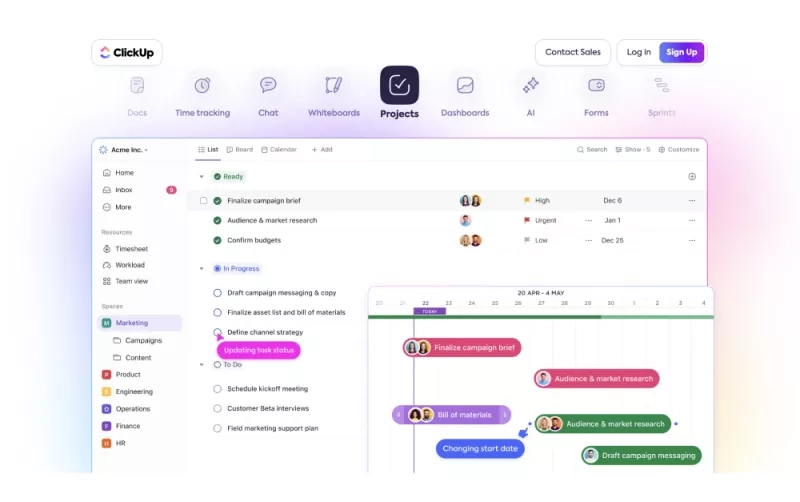
ClickUp is productivity and project management software designed to organize work into tasks and help teams collaborate. Team members can provide input or feedback on each task as it moves through workflow stages such as ‘idea’, ‘in-progress’, ‘ready for sign-off’, and ‘to be scheduled’.
How it helps
This tool declutters your tasks and streamlines your workflow. By centralizing all your projects in this one platform, there’s no need to switch between tools. Plus, ClickUp AI helps you brainstorm, outline, plan, and more.
Smart ways to use it
- Generate milestones suited to your event project
- Tag team members to request input or feedback
- Speed up the process of creating the first draft of a blog
- Outline your email campaigns
8. Zenus
Zenus supports feedback gathering and engagement data with sentiment analysis.

What it does
Zenus’ audience facial analysis tells you, for example, what attendees thought of the keynote speaker in the moment. Without harvesting personal data, cameras set up around the auditorium measure sentiment such as boredom (yawns, people looking at their phones) or joy (smiling, laughing, applauding).
How it helps
Attendees will often give you survey feedback they think you want to hear. Facial sentiment analysis gives a more authentic read on which parts of your event attendees found interesting and which sessions missed the mark.
Smart ways to use it
- Instead of using surveys or walking around your event to gauge attendees' moods, use Zenus to capture happiness sentiment in the moment. Create ‘Happy Maps’ to visualize joy and engagement in different areas of the venue.
- Understand traffic flow and engagement levels with detailed analytics on attendee movements and interactions.
- Control access to different event areas based on attendee profiles and permissions.
9. Beautiful.AI
When you’re stretched for time and deadlines are approaching, the last thing you want is to spend hours on presentations.
What it does
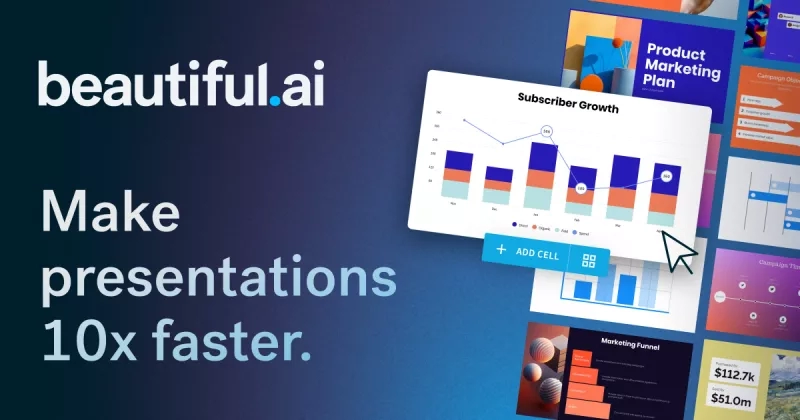
Beautiful.ai makes it easy to create or modify slides and presentations from scratch. Plus, it lets you edit and align to your brand guidelines. It’s great for team projects, too, since multiple users can work on the same presentation at the same time.
Add a prompt or upload an outline, and the tool will create a deck. Alternatively, upload an existing deck, and it will create smart layouts of your content.
How it helps
Beautiful.ai takes the stress out of presentation creation so that you can focus on the attendee experience and meeting your event goals. Better-designed, consistent presentations engage and impress.
Smart ways to use it
- Create polished presentations aligned with your brand guidelines.
- Visualize data and insights clearly and attractively for stakeholders.
- Make existing slide presentations more appealing with suggested smart layouts
10. Vendelux
Busy schedules can make it hard to attend, sponsor, exhibit at, or even know about every conference or trade show in your sector. Wouldn’t it be useful to have an AI tool that could analyze them all for you?

What it does
Vendelux recommends trade shows, conferences, and industry events based on the people you want to meet.
Built on data from more than 250,000 global B2B events, the platform analyzes attendee profiles, historical attendance patterns, and your ideal customer profile to identify where your prospects, customers, and competitors are most likely to be. It can also notify you when target accounts or competitors register for upcoming events, helping you prioritize sponsorships, speaking opportunities, and sales outreach with greater confidence.
How it helps
Vendelux helps you invest budget where it's most likely to generate pipeline and revenue.
AI-powered recommendations make it easier to discover high-value events, uncover niche opportunities, and focus your time on the audiences that matter most. It also helps you identify target personas before an event, coordinate outreach earlier, and arrive with a clearer plan for who to meet.
Smart ways to use it
- Discover the trade shows and conferences your ideal customers are most likely to attend.
- Receive alerts when customers, prospects, or competitors register for relevant events.
- Identify niche industry events that closely match your target audience.
- Prioritize sponsorships and event investments using intelligence instead of assumptions.
11. Canva
If your design team is overloaded and you need social posts, marketing material or other graphic design formats fast, Canva lets you do it yourself without sacrificing quality.
What it does
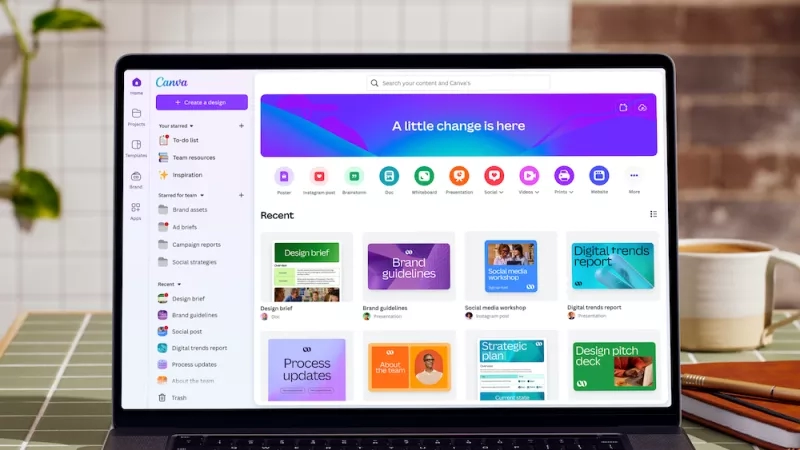
Canva helps you create templated visual content, including presentations, social media graphics, posters, flyers, documents, and other marketing materials. Its AI features take the tool a step further by letting you create attractive designs, images, illustrations, video avatars, and voiceovers.
How it helps
Canva’s user-friendly AI interface saves you time on graphic design. It also lets you collaborate with team members, making reviews easier.
Smart ways to use it
- Use Canva to create an attractive social media graphic that promotes an upcoming webinar and follows your brand guidelines.
- Are you planning an exclusive dinner for top clients? Use Canva to create beautiful, on-brand invitations, ready to be sent to the printer with bleed marks.
- Use Canva AI to remove the background of your speaker bios.
12. Cvent Assistant
Event planners don't have time to stop what they're doing every time they need an answer. Cvent Assistant brings AI-powered support into the Cvent workflow, helping organizers get help and keep moving.
What it does
Cvent Assistant is an AI assistant built into the Cvent platform. You can ask questions in natural language and get answers based on your event.
For example, you can ask for registration counts, breakdowns, trends, comparisons, or session-level insights, and get the information directly in the Assistant instead of building a report or exporting data. You can also ask how to set up pricing and get step-by-step guidance.
How it helps
Cvent Assistant reduces the friction of switching between tools or running reports, and that's just the beginning. It'll soon help with creating events, venue recommendations, and attendee management too.
With the insights capability, you can move from a question to a clear answer faster. You can check registration pacing, compare audiences or events, and spot session patterns that inform your next decision.
Smart ways to use it
- Ask how-to questions while building or managing your event.
- Ask for registration counts, breakdowns, and time-based trends in plain language.
- Compare registration or session data across events or time periods.
- Surface session attendance, capacity risk, waitlists, or drop-off signals.
- Create a support case with AI-generated summaries, files, or screenshots when an issue needs deeper help.
- Request a callback or live chat when you need to work with a support expert.
The future of AI-powered events starts here
Getting to grips with AI tools will give you more time to focus on creating memorable attendee experiences. They can help you personalize the attendee journey, source venues and vendors, capture session insights, create and repurpose content, identify the right trade shows or conferences for you, and much more.
The trick is to choose platforms and tools built for your marketing and event-planning needs that integrate into your workflows and improve your processes.
To continue learning about how AI can improve your day-to-day role, read our Mastering AI for Eventsguide, featuring practical strategies and expert advice.


