


Webinars have not just become one of the most dependable tools in a B2B marketer’s playbook, but also one of the most competitive ones. With virtual events, demos, workshops, and trainings happening daily, the challenge isn’t just getting registrations; it’s holding attention, encouraging participation, and delivering measurable value.
Market Research Future (2024) projects that the global webinar market will surpass USD 134 billion by 2032. This explosive market growth is a signal to marketers and event planners that simply hosting more webinars isn’t enough to drive impact. As competition intensifies, standing out requires a shift towards more interactive, engaging events rather than run-of-the-mill presentations.
In this guide, we’ll break down how to design interactive webinars that hold attention from start to finish, using proven engagement principles, real-world B2B examples, and best practices drawn from modern event programs, including how to measure what actually worked after the webinar ends.
Why Interactivity Is Important
Before diving into tactics, it’s important to understand why interactivity matters while hosting a webinar.
Audiences today can consume content anywhere – be it through blogs, videos, social posts, and AI summaries. What makes webinars unique is the ability to participate in real time. By adding interactive elements, webinars shift from passive viewing to meaningful participation, helping brands foster trust and nurture more qualified leads.
Interactive webinars drive measurable B2B results by:
- Boosting live attendance and slashing "early exit" rates by keeping viewers involved.
- Trading basic registration info for rich first-party insights gathered via polls, chat, and Q&A.
- Increasing content relevance by tailoring your message to real-time audience feedback.
- Using engaged CTAs to turn active participation into a stronger sales pipeline.
If you’re new to webinars or looking to refine your strategy, it helps to start with a clear understanding of what a webinar is and how it works, as well as the different webinar types you can design for different goals.
Choose an Engaging Webinar Title
Interactivity starts long before the webinar goes live. It begins with the title. Today’s audiences are selective about how they spend their time, and a generic webinar title can be the difference between a registration and a scroll past. That’s why many marketers are rethinking how they position webinars, using language that conveys learning, collaboration, and real outcomes rather than passive listening.
In fact, as per a survey by Contrast, 83% of marketers now use more engaging language, such as “masterclass,” “workshop,” “live training,” or “virtual event,” to position webinars as high-value, interactive experiences rather than passive sessions.
What makes a webinar title engaging?
An effective webinar title usually has the following qualities:
- It’s clear and concise; no pfaff
- It sets expectations straight about what one can take away from attending this webinar.
- And of course, the title should be relevant for your target audience.
Here’s a real-life example from one of Cvent’s latest webinars:
“What a Year of Event Data Taught Us—and How to Win”
This title works because it clearly indicates that the session will focus on data-backed insights,it’s not too long and neither too short to be vague, and it promises next steps to make your events smarter.
Start With a Bang: Hook Your Audience in the First 5 Minutes
Once attendees join, you have a short window to earn their attention. Skip the housekeeping and the lengthy introductions. The first few minutes should be about them, not you.
1. Lead with interaction, not logistics
Instead of opening with a long agenda or speaker bios, start with a poll or chat prompt:
- “If you could magically delete one ‘headache’ from your planning process, which one would it be?”
- “How much of your event planning is powered by AI?”
This not only helps you understand your attendees from the get-go but also prompts them to participate throughout the session.
2. Set expectations early
Let your audience know how they’ll need to be active participants throughout the session via polls, Q&A, chat, or live discussion. When people know interaction is expected, they’re more likely to stay engaged.
3. Frame the session with a strong narrative
Position the webinar around a real challenge, insight, or transformation. This storytelling approach creates emotional buy-in and sets the stage for deeper engagement during and after the webinar.
Use Polls and Questions to Drive Ongoing Participation
The best hosts don't guess their audience’s needs—they ask. Polls are the simplest way to kill boredom and unlock the audience insights you’ve been missing. When used correctly, they keep attendees engaged and provide valuable insights. Here are some best practices for using polls:
1. Use polls consistently, not sparingly
Try to include a poll every 10–15 minutes to re-engage attention and maintain momentum.
2. Ask meaningful questions
Put some thought into why you need a particular poll question or how it can be used to plan future webinars/campaigns.
One interesting way to engage attendees through polls is to ask questions such as “Guess the Outcome.” For example, if you have a slide in your presentation about a Client Success Story, you can ask attendees to guess the outcome of that success story before presenting that particular slide using a multiple-choice poll, thereby building excitement even before the Client Success Story is fully revealed.
3. Share and discuss results live
Displaying poll results in real time validates participation and sparks discussion, making attendees feel heard. A typical example of such polls is asking questions about the pulse of the industry, the current challenges your audience is facing, whether they are currently using a product or solution to mitigate those challenges, etc.
Polls also play a critical role in designing more engaging webinars and shaping smarter follow-up strategies.
Keep the Chat Active (Without Letting It Get Chaotic)
Chat is no longer just a side feature. Parallel conversations, when managed well, significantly enhance engagement during any virtual event or webinar. Tips on how to make Chat as a webinar feature work for you:
1. Assign a dedicated moderator
A moderator can welcome attendees, prompt discussions, and surface relevant questions or insights.
2. Seed the conversation
While polls are great, some attendees use the Chat section to engage with the speakers and other attendees. As a moderator, you can ask questions such as - “Does this align with your experience?” “What tools are you using today?” to kickstart a discussion amongst attendees.
3. Acknowledge participants
Referencing attendee comments (by name, when appropriate) reinforces community and connection and holds attendees’ attention throughout the session.
When done right, chat creates a sense of shared experience rather than distraction.
Use Visuals and Media to Break the Monotony
It’s called the Picture Superiority Effect: people typically remember 65% of what they see, compared to only 10% of what they hear. If you want your webinar to stick, incorporating visuals keeps your audience focused and prevents that dreaded 'tab-switching' itch. Here are some ways to elevate your visuals:
1. Move beyond static slides
Try to incorporate short video clips, live demos, or screen shares for “product-demo” or “workshops”. Leverage animated charts or dashboards for data-heavy insights. Use GIFs in between slides to provide necessary breathers during the session.
2. Design slides for interaction
Use prompts like: “Poll Time!” “Drop a thumbs-up in the chat if you agree!”
3. Creativity should not overpower clarity
Visuals should support the message, not overwhelm it. Every element should have a purpose tied to the webinar's key takeaways.

Make Q&A a Core Part of the Experience
The Q&A section of any webinar often delivers the most value to attendees, as it allows them to get their questions answered in real time and gain insights from the questions others ask, thereby creating a learning and shared experience for everyone. Here’s how you can elevate your Q&A:
1. Allow questions throughout the webinar
Don’t limit questions to the final minutes; letting attendees ask as they go keeps the session dynamic and engaging. However, dedicate 10-15 minutes after covering the session content to address relevant questions.
2. Prioritise with upvoting
Let attendees vote on questions so speakers can address what matters most, while also surfacing common themes or challenges shared across the audience.
3. Integrate Q&A into the content flow
Pause at natural moments to answer relevant questions rather than saving everything for the end, which helps maintain momentum and prevents important discussions from feeling rushed.
This approach reinforces that the webinar is a conversation, not a broadcast.
End with a Clear, Action-Oriented Call to Action
A strong webinar doesn’t just end—it guides attendees toward what’s next. Here are some best practices for designing a click-worthy CTA:
1. Align the CTA with attendee intent:
Not all attendees joining a webinar are ready to book a product demo. So, it’s important to choose the most high-impact call to action for your webinar. It could be downloading a related resource, registering for an upcoming event, booking a demo with sales, or contacting the speakers.
2. Make the CTA interactive
Use clickable buttons, chat prompts, or polls instead of a static slide to reduce friction and capture intent in the moment. With Cvent’s Webinar Platform, hosts or moderators can launch a CTA button directly on attendees’ screens, ensuring high visibility and eliminating the need for QR codes that often slow down action at the end of a webinar.
3. Track performance with UTM-enabled links
Best practice is to always use UTM parameters in webinar CTAs. This allows you to measure click-through rate, form fills, leads generated, and, finally, revenue attribution.
CTAs play a crucial role in moving attendees through your webinar funnel.
Analyse Webinar Engagement Metrics to Improve Future Sessions
Interactivity doesn’t end when the webinar does. The real learning begins once the session is over. Reviewing engagement data helps B2B marketers understand what resonated, what didn’t, and how to continuously improve future webinars.
Key webinar metrics B2B marketers should analyse:
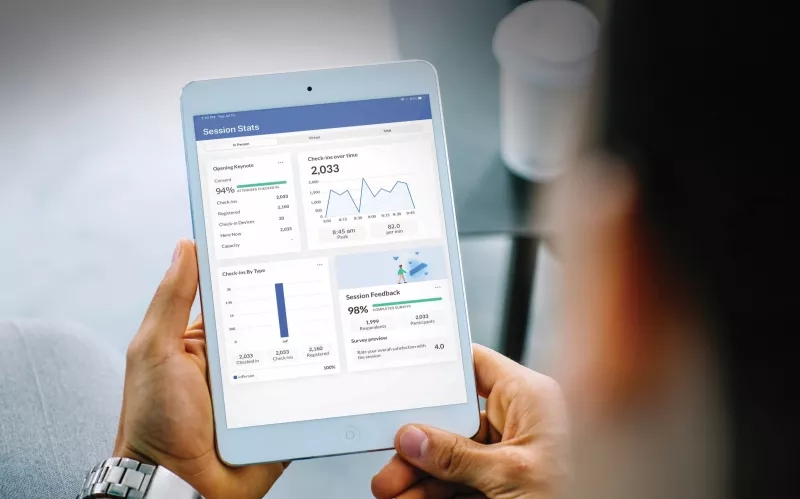
1. Poll participation rates
Review how many attendees responded to each poll and which options received the most votes, as these insights reveal audience priorities and can directly help you decide future webinar topics, messaging, and session content.
2. CTA click-through rates
Track how many attendees clicked on UTM-enabled links to understand post-webinar intent. Use this data to identify which offers, messages, or webinar moments drove the strongest actions.
3. Average watch time
Identify how long attendees stayed engaged and which sections retained the most attention, helping you pinpoint where content resonated and where pacing, format, or depth may need adjustment.
4. Drop-off points
Analyse when live attendance started declining to uncover patterns, such as extended monologues or overly product-focused segments, that signal opportunities to improve structure, pacing, and engagement.
Post-event analysis is a cornerstone of effective online webinar management and enables continuous improvement across your webinar program.
Keep It Human, Fun, and Authentic
Professional doesn’t have to mean stiff. Some ways for you to humanise your webinars are
- Using light gamification, like quizzes or challenges. For example, encouraging attendees to use the reactions feature, upvoting the questions that resonate most with them, or offering a voucher or gift coupon for completing a product demo with us after the webinar.
- Encouraging speakers to be conversational rather than scripted prevents the attendees from getting bored or dropping off halfway.
- Vary the pacing of the content being presented, or divide it by the speaker’s expertise, so they’re more comfortable discussing it during a live webinar.
Audiences connect with authenticity. A webinar that feels human is more memorable and more effective.
Choose Webinar Technology That Enables Interactivity at Scale
Even the best strategy needs the right platform to succeed. But the question is, what should you look for in a webinar platform?
1. Robust engagement features
Live polls, chat moderation, Q&A, and analytics should be built in, not bolted onto a webinar management platform. Explore platforms with robust webinar engagement features that enable seamless interactions with the attendees.
2. Reliable, scalable infrastructure
Enterprise-grade webinar technology ensures smooth experiences for both hosts and attendees. Purchasing such webinar technology may involve a one-time cost, but it’s well worth the time and effort marketers invest in creating a consistent, on-brand webinar program for the entire year.
3. Integration with your marketing stack
Your platform should connect with CRM, marketing automation, and reporting tools to support end-to-end measurement and optimisation.
Choosing the right webinar platform lets your team focus on engagement and not just execution.
Final Thoughts: Designing Webinars That Deliver Lasting Value
Interactive webinars aren’t just a trend; they’re the standard. By combining strong openings, compelling titles, consistent engagement tactics, thoughtful analytics, and the right technology, B2B marketers can turn webinars into high-impact experiences that educate, inspire, and convert.
When intentionally designed, webinars become more than virtual sessions; they become powerful touchpoints that build trust, generate insights, and drive meaningful business outcomes.

Muskan Hans
You may also like


More Reading

The Presence Premium™: Why showing up is worth more than ever

The Story Behind Cvent’s Rebrand

How to Measure the Event Metric Most Teams Are Missing: Trust


Why Cvent


